
Online Payment Information
Web banner photo: Sherri Sosslau
It's easy to access the online pay portal on this website. Take a look at any page to locate the bell icon🔔in the upper-right-hand corner of the webpage. See the graphic below.
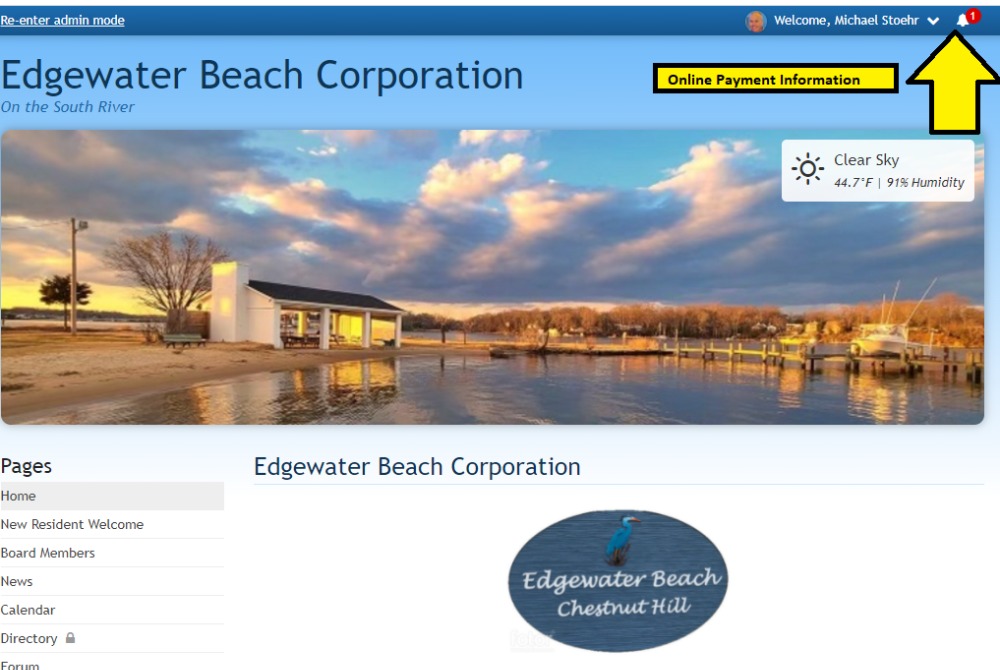
1. When you click on the bell icon🔔, a drop-down window with a link to the payment choice will appear. Select the payment option you'd like to use by clicking on this link.
2. Choose your payment and payment method. Click the blue "Pay Now" button when you're finished.
3. If you pay with a credit card, your transaction should be completed right away, whereas bank payments typically take 3 to 5 business days to process. Once your payment has completed processing, you will receive an email with a receipt of your payment.
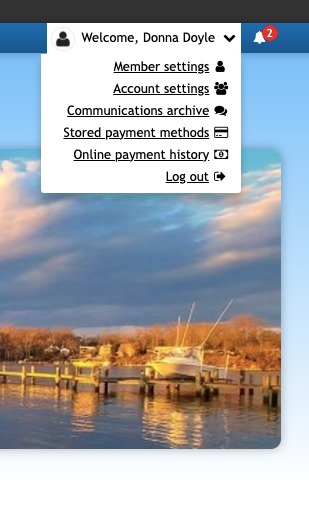
You can check the Online Payment History from the drop down menu in your to see if . Only online payments are listed, if you paid by check, you will need to look at your banking info.
NOTE: If you still have questions about your membership status, please contact the Membership Director, Donna Doyle, here.
Pages
- Home
- New Resident Welcome
- Members in Good Standing
- Online Payment Information
- Board Members
- News
- Calendar
- Forum
- Amenities
- Beach Shelter
- Kayak Rack
- Kayak Rack Assignment List
- Boat Slip
- Boat Slip Assignments
- Boat Ramp
- Documents
- Governing Documents
- Meeting Minutes
- Agendas
- Financials
- Resident Directory
- Plat
- Map
- Photo Gallery
- Our Community
- Contact the Board
- FAQs
- Board Only